Queue
The Queue is Wardian's app-level triage surface for completed work. It is separate from the workflow engine: agents and workflows can produce outcomes, and the Queue keeps those outcomes visible after the originating terminal or workflow run has moved on.
Use it when you need to review finished work, catch failed workflow runs, respond to agents that need input, or return to unread outcomes after switching away from the originating agent.
When to Use It
- Review agent completions after working in Grid, Command Panel, or the Wardian CLI.
- Triage workflow completions and failures from the Workflow View.
- Keep unread outcomes visible while you inspect files, source control, or follow-up terminals.
What Appears in the Queue
Wardian records these item types:
- Agent task completed: added from the live app completion projection when an agent transitions out of active work or a workflow reports an outcome. Wardian uses provider transcript text or structured reply text when available; otherwise it records a generic completion summary. Completed structured ask/reply interactions are durable control-plane evidence; ordinary status-derived completion cards are Queue projections, not replayable interaction records.
- Workflow completed or Workflow failed: added when the app receives a final workflow run status. If the workflow produced text output, Wardian can use that as the queue summary.
- Action needed: added when provider runtime evidence shows that an agent needs input. Most Action needed cards are provider-sourced permission, approval, authentication, or selection prompts. They are not inferred from Wardian's structured ask/reply lifecycle.
Workflow failures are filterable separately from successful workflow completions, even though both are workflow outcome cards.
Reading Queue Items
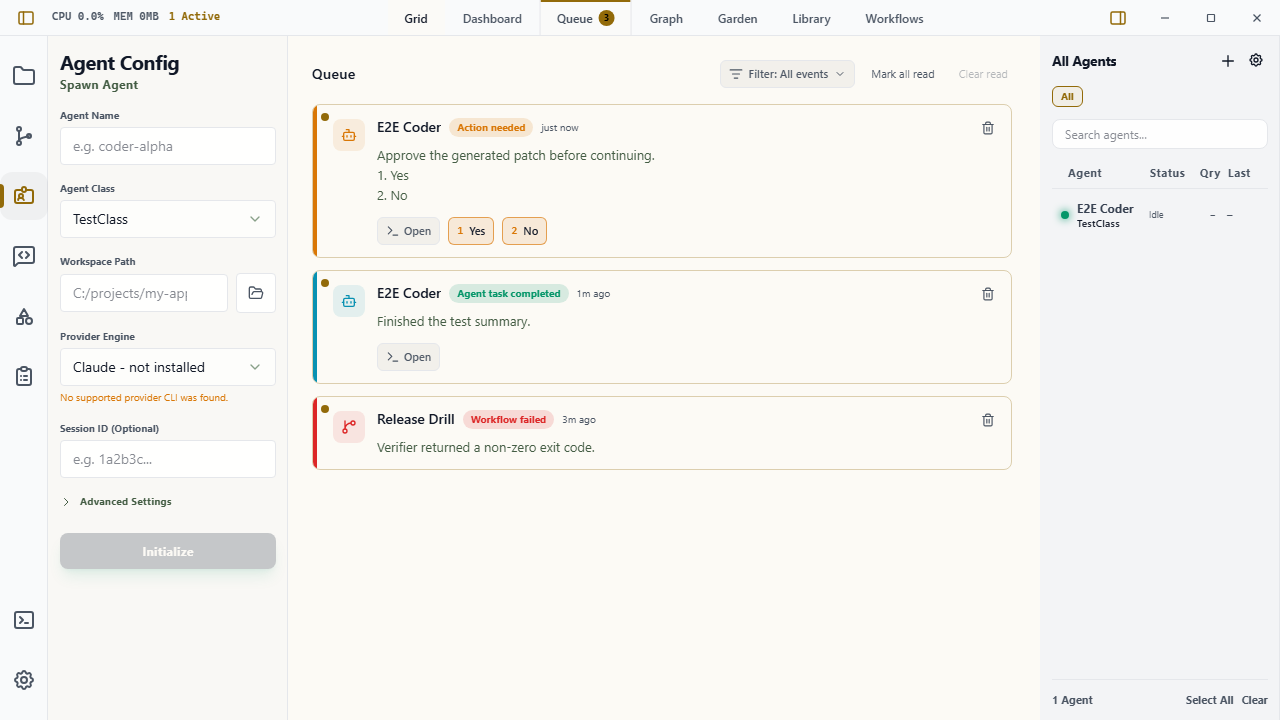
Open Queue from the top workspace tabs. Unread items appear at the top and increment the Queue tab badge.
Each item shows:
- source type and status
- agent name or workflow name
- relative completion time
- summary text or failure details
Long summaries are collapsed by default. Use Show details to expand them, or Hide details to collapse them again.
Use the Filter dropdown in the Queue header to choose which event types are visible:
- Action needed
- Agent completions
- Workflow completions
- Workflow failures
These preferences persist under the active Wardian home.
Triage Actions
- Click an item to mark it read.
- Use Open on an agent card to focus the related agent terminal when the session still exists.
- Use the response buttons on an Action needed card when Wardian recognizes provider choices such as
1. Yesor2. No. - Use Open when the action request needs context, editing, or a response format Wardian cannot infer safely.
- Use Mark all read when the full queue has been reviewed.
- Use Clear read to remove reviewed items.
- Use the trash icon on an individual item to dismiss it immediately.
Queue items are persisted under the active Wardian home, so unread work survives app restarts. Items older than seven days are ignored when the Queue loads.
Evidence and Deduplication
Queue cards are projections of live runtime or interaction evidence. Each card can carry a stable evidence_id and an evidence_source:
provider_runtime: a live provider event or status transition, such as a permission request or turn completion projectioninteraction_store: a Wardian interaction event, such as a completed structured ask/reply tasklive_runtime: a live Wardian runtime event that has not been promoted to a more specific source
Wardian uses stable evidence IDs to avoid duplicate cards when the app refreshes, terminals repaint, or provider logs are replayed. Startup hydration can restore existing queue cards, statuses, interactions, and provider input state, but hydration must not create new Action needed or completion evidence.
This source split matters for status handling. Provider runtime status remains authoritative for provider-internal states such as action_required, permission prompts, and authentication prompts. Wardian interaction status tracks communication lifecycle states such as queued, delivered, awaiting reply, completed, failed, or expired.
Alerts
Queue alert preferences live in Settings > Queue and are per event type:
- Desktop alert
- Sound alert
By default, desktop and sound alerts are enabled only for Action needed. Passive completions and workflow outcomes stay quiet unless you opt in. Settings also includes a Sound volume slider for Wardian's local queue tone. The default volume is 50%.
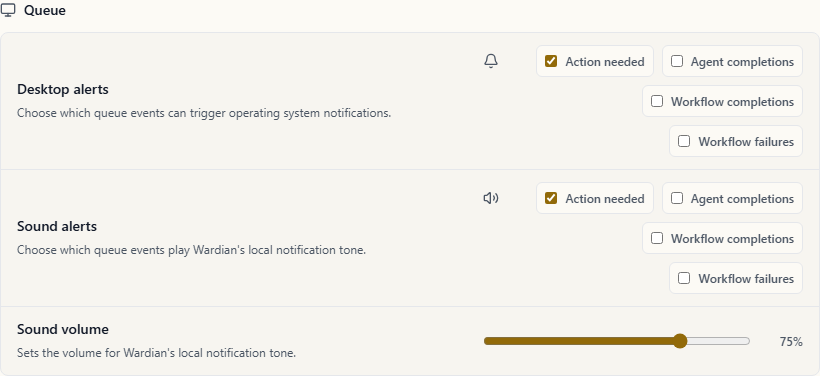
Desktop alerts use Wardian's native desktop notification plugin when available, with the WebView notification API as a fallback. Sound alerts play a short local Web Audio tone at the configured volume. If either capability is blocked by system policy, the Queue still records the item.
Practical Workflow
- Let agents or workflows run from the Grid, Command Panel, CLI, or Workflow view.
- Watch the Queue badge for new completions.
- Open Queue, review summaries, and expand details when the summary was truncated.
- Open the source agent terminal or choose a visible response button when an Action needed card appears.
- Mark reviewed items read and clear them when they are no longer needed.
Important Limits
- Items older than seven days are ignored on load.
- A generic "Completed" summary means Wardian did not capture a provider-specific final answer for that transition.
- Generic approval-looking text does not create response buttons. Queue only shows buttons when it can read explicit provider choices from canonical provider evidence.
- Clearing read items removes them from the visible queue for the active Wardian home.
- Desktop alerts depend on operating system notification permissions, and WebView fallback alerts depend on WebView notification permissions. Sound alerts can still be affected by system audio and browser audio policy.
- Replayed terminal output and startup hydration should not create new queue cards. If duplicates appear after restart, capture the card evidence ID/source and file a bug.