Garden
The Garden is a hierarchical habitat for exploring Wardian's work. Districts contain cell-like agents and workspace ground; entering an agent, workspace, or situated automation reveals its composition, then readable records. Position reflects shared teams, workspaces, worktrees, and concrete assignments. Skills appear on their carriers and inside Skills, not as independent map units. Unassigned Library blueprints and completed one-off automation runs do not populate the map.
Use the Garden when you want to see the shape of your setup: which agents cluster around a repository, which agents participate in a routine, what files they changed, and what evidence supports a memory or run stage.
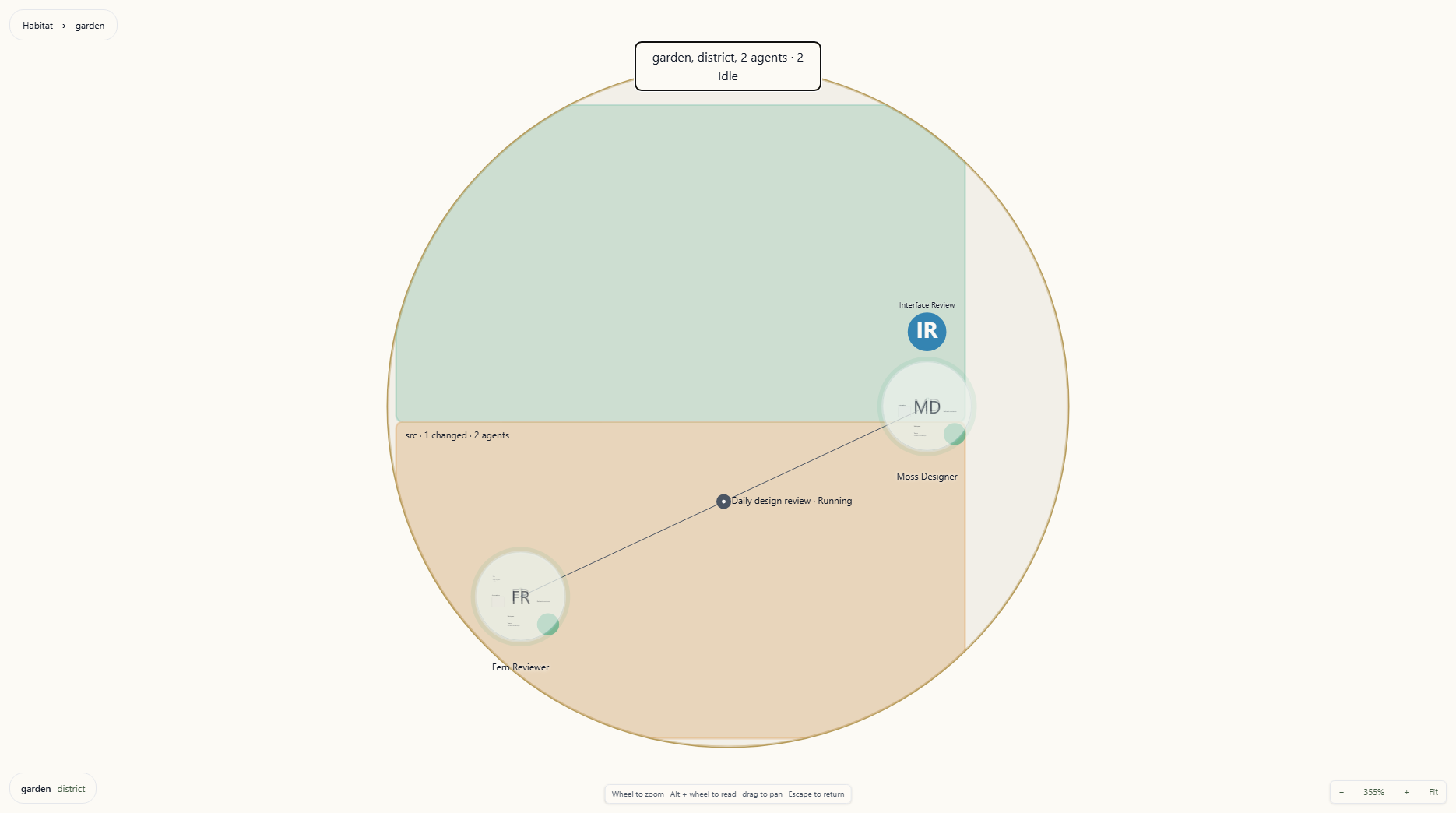
Agent cells share stable workstream geography with workspace ground and situated routines.
How Position Is Decided
Each unit is described by facets taken from records Wardian already keeps — a workspace path and every directory above it, team membership, agent class, provider, worktree, the agents a skill is deployed to, the agents an automation is bound to. Two units are close when they share facets, and a shared facet counts in proportion to how rare it is. Sharing a provider with twenty other agents says almost nothing about you; sharing a worktree with one other agent says a great deal.
Canonical relationships determine district membership. Settled positions and manual placements are retained so reloading does not shuffle familiar landmarks. Live status and file activity change emphasis without moving those landmarks.
Districts
Every unit belongs to a district, chosen by the strongest tie it has, in this order:
- Team — the agent is in a team.
- Fallback — an explicit override recorded for the agent.
- Worktree — the agent runs in a git worktree of a repository.
- Workspace — the agent runs in a folder no other tie describes.
- Commons — nothing ties this unit anywhere in particular.
Districts occupy stable cells in rings sized for their contents. Coordinating districts can sit nearer the centre; proximity reflects relationships rather than alphabetical or creation order. Commons is the fallback territory, not an assertion that every unassigned Library item belongs on the map.
At a distance, agents are status signals. Closer in, they become named cell-like inhabitants with skill marks. Enter a district to fit its workstream, then enter an agent or workspace to inspect its contents.
Compositions and Records
Agents use the same five regions so their contents remain easy to find.
The agent circle and its regions keep their world geometry. Zooming closer reveals records at their source anchors. Record, workspace, and automation labels keep their centre and width while their outlines grow smoothly in height into reading planes. Zooming out reverses the change, keeping the surrounding geography connected.
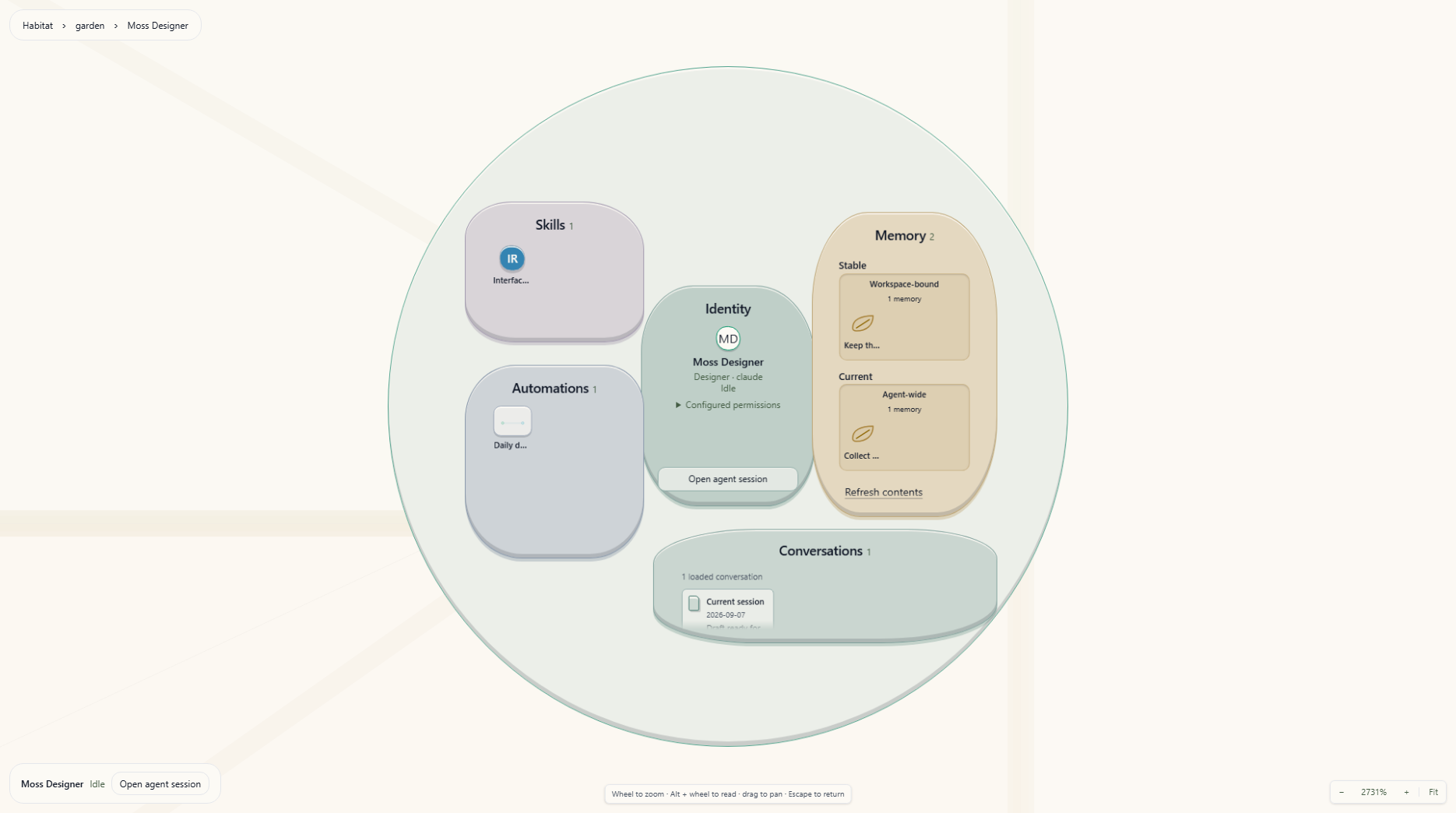
Zoom into an agent cell to reveal contained objects, then approach a record to read it.
Colored trays, defined rims and shallow raised objects distinguish the five direct organelles. Their material colors identify regions; status markings still show Idle, Processing, Action Required, Off and Error. Each region keeps its place as its collection grows, so a busy agent remains recognizable.
Skills appear as glyphs, memories as individual seeds, routines as execution nodes, and connections as endpoints. Short labels emerge as you approach; hovering, focusing or selecting an object reveals its label fully. Memory seeds keep Stable/Current and scope grouping; enter one for its full text and evidence. Collections show loaded counts. With more than 48 loaded memories, Find memory searches their text; Enter or Find next memory focuses the next match without rearranging the collection. Enter that object to read its evidence. Conversations exposes every loaded conversation summary directly, with dates and expandable excerpts. Skill provenance remains in its accessible label and hover description, with canonical details available through the skill record.
Assigned routine definitions remain part of Garden geography. A manual automation appears while it is running or awaiting approval, then leaves the Garden when it completes or fails. Its durable evidence remains available in Automation Monitor and Observe; recent scheduled execution state stays folded into the routine it belongs to instead of creating a separate historical cell.
Entering an agent, workspace, automation, or record brings it to a readable scale. On a small or short viewport, the outer plane or membrane may extend offscreen while the reading column fits the available width and height. Text flows inside without moving its anchor. Pan or zoom to explore the surrounding plane and geography.
| Region | Contents |
|---|---|
| Identity | Purpose, class, provider, model, saved permission settings, and Open agent session |
| Skills | Deployed skills with direct, class-inherited, or global provenance and linked or copied state |
| Memory | Stable and Current records, grouped by agent-wide or workspace-bound scope |
| Automations | Assigned routines and active manual runs |
| Conversations | Current and previous conversation summaries with dates and expandable excerpts |
Saved permission settings describe configuration; runtime application may require a restart. Workspace, team and peer relationships remain visible in the district geography rather than being repeated inside every agent.
Memory records show full text, scope, evidence, sources, verification time, and revision history. Skill records expose Open in Library. File records show available content, change evidence, attributed agents, turns, and baseline; Open file opens a changed text file with its comparison, while unchanged or binary files follow file-opening preferences. Opening the comparison records review for attributed agents; merely selecting the file does not.
Open agent session is an explicit action in the agent selection summary and Identity region/record. It opens or focuses the canonical Agent Session terminal through contextual Workbench navigation, preserving Garden as its own surface. This is an exception to Graph and Inbox, which prefer an existing Agents view. Double-clicking the agent first enters its composition. Workbench Back or closing the destination returns to Garden's saved spatial context.
Workspace Activity and Attribution
The map loads immediate workspace-root listings for stable ground. Deeper activity comes from change ancestry inside workspace composition, which shows changed files grouped under the ancestors needed to reach them, including deleted files absent from directory listings. Select an agent to highlight attributed paths, or a path/group to highlight its participating agents. Selection reveals attribution threads without drawing every relationship at once. Attributed and inferred evidence remain distinct; an inferred write does not establish an agent owner.
Inside a workspace, File activity → Turn range controls file recency. The overview always includes all compared changes.
| Turn range | Included activity |
|---|---|
| Latest 2 turns | Newest two turns of known activity |
| Latest 16 turns (default) | Newest sixteen turns of known activity |
| All compared changes | All changes in the current workspace comparison, without a recency cutoff |
Unknown or inferred recency is retained, not treated as proof of inactivity. Turn windows are relative to the change summary's newest turn, not elapsed minutes. All compared changes does not change the comparison baseline: Garden uses the workspace-wide HEAD or branch-point preference, falling back to branch point when the preference requires a single agent. Inspect the file record's baseline when comparing it with an agent-scoped Changes pane.
Enable Show full tree inside a workspace to browse unchanged contents. This disables the turn-range control while all folder contents are shown. Directory listings are paged; use Next folder page there or Load next page on the map when offered.
Situated Automations
An automation projection represents a direct binding, a schedule, or an unscheduled run. Separate schedules of one blueprint remain separate objects; scheduled runs contribute to their schedule's projection. A role: or class: requirement alone does not locate a blueprint.
- One concrete agent: an attached routine, packed into deterministic expanding rings with its sibling routines rather than a linear list.
- Several concrete agents: a directed route through participants in execution order, retaining returns to an earlier agent.
- No concrete agent, but a configured workspace: a workspace routine.
- No concrete agent or workspace: no invented map location; use Automation Monitor. Missing map participants can also prevent a route from being drawn.
Running and awaiting-approval runs remain eligible regardless of age. Scheduled evidence remains recent for 24 hours, using its update time, then completion or start time when absent, and stays folded into its routine. Completed and failed unscheduled runs do not populate the map. This rule is separate from the file-activity range. An open routine or stage keeps its evidence while its automation remains in the Garden breadcrumb without putting historical trails back on the map. Historical evidence also remains available in Automation Monitor.
Ordinary connections recede at the habitat overview and return as you zoom closer. Dense attachment labels wait until the rings have enough screen circumference; selecting a routine always reveals its label. A failed stage is marked with a compact local × rather than a halo around the agent. Approval attention remains distinct.
Enter a routine or route to inspect its schedule and separate run lanes. A stage record shows assignment, state, inputs, and recorded outputs/events; temporary providers are labelled as temporary assignments. Open automation definition opens the canonical definition. Garden does not edit schedules or resolve approvals inside the composition.
Navigating the Map
- Click or Space selects and explains without moving the camera or opening another surface. Double-click or Enter opens the next composition or record by animating the same camera. Touch users can select, then use the explicit Enter/Open record action.
- Escape animates the same camera out one level. Use the breadcrumb to return to an ancestor or Habitat through that camera.
- Wheel zooms through every scale, including compositions and records; reverse wheel zooms back out. Zoom uses the wheel delta, so high-resolution trackpads move continuously while each regular notch covers more ground. Focused detail uses a gentler step while its reading plane reshapes. Zoom is anchored at the pointer, so the point under the cursor stays put.
- Alt + wheel explicitly scrolls overflowing record content under the pointer. Ordinary wheel over content continues to zoom the world. Use Tab to focus a named reading region, then scroll with the keyboard using arrows, Page Up/Page Down, and Home/End.
- Drag the background to pan.
- Arrow keys pan when the canvas has focus; hold Shift for larger steps. On a semantic object, arrows move keyboard focus; Home/End reach the first or last object. A coarse cell can receive keyboard focus before its inner controls become readable; Enter brings it closer. Tab reaches the object controls and composition actions.
+/-to zoom in and out.0orfto fit the whole map into view.
The current zoom level is shown in the bottom-right controls, next to buttons for zooming and for Fit. The zoom readout is worth checking first if the canvas ever looks empty — it usually means the view is scrolled away from the content rather than that there is nothing to show.
Zooming toward a selected map object can enter its next scale once it is large enough, continuing into its regions and records in the same world. Empty-space zoom does not choose an object. Zoom out to retrace the hierarchy, or use Escape or breadcrumbs. Reduced motion preserves the same camera destinations and spatial relationships while suppressing travel animation.
Moving Units by Hand
Drag an agent at workstream scale to place it inside its own district. The position is saved and survives restarts and re-layouts.
A drag adjusts where a unit sits within its neighbourhood; it does not change which neighbourhood the unit is in. District membership comes from the canonical records above, so dropping a unit beyond its district's edge places it at the edge rather than moving it into the district next door.
Use Reset layout to discard every hand placement and return to the derived layout.
Workspace ground, automation routes, and internal records are derived and do not support manual placement.
Loading and Unavailable Data
Memory and conversations load independently as an agent approaches inspection scale. Distant previews do not read every agent's contents. Recently read snapshots are retained briefly within that Garden surface for reverse travel. Refresh contents retries these reads; a retained snapshot is labelled stale. Records provide Retry when reads fail, including unavailable or restricted files. Directory and activity failures are reported in workspace composition. Automation data can be incomplete or stale; its notice provides Retry and details. A failed projection refresh keeps that routine's known snapshot marked stale while unrelated routines continue updating. Map expiry still applies; retained evidence for an open composition is separate. Open Map coverage beside navigation to check additional automation definitions, run records or folder contents. Checking more runs may leave the map unchanged: only active runs and runs updated within 24 hours appear. Some active or recent runs can still be beyond the loaded window, so incomplete coverage is named explicitly.
An agent removed from the roster, unavailable routine evidence, or an unavailable saved stage keeps a return path through the breadcrumb. An empty or failed read is not evidence that no work exists.
If an older saved trail lacks the position needed to reopen a record, Garden returns to the nearest available agent or district in that trail. A notice explains the recovery so you can continue navigating from a known place.
Where the State Lives
The Garden's derived layout is not a source of truth for anything. Districts, distances, and clustering are all computed from records that already exist: the agent roster, topology.json, team membership, the automation library, and schedule records. Change any of those and the map follows.
Garden's scene store retains manual district-relative placements, district cells, visits, and settled geometry in browser storage. Each Workbench Garden surface persists its selection, breadcrumb trail (including return cameras), current camera, and file-activity range in Workbench state. These are view preferences, not copies of agent configuration, memory, file contents, or automation truth. Camera saves settle after a zoom or pan gesture; leaving the surface flushes the latest position.
When an agent is deleted, the scene drops its settled position and visit time the next time the layout is saved. Manual placements and district exclusions are kept, so an agent that returns lands where you put it. The Garden prunes only after Wardian has finished restoring the full agent roster and the latest roster load succeeded. An agent hidden by the active watchlist still exists, so its saved position is kept.